Reading rule results
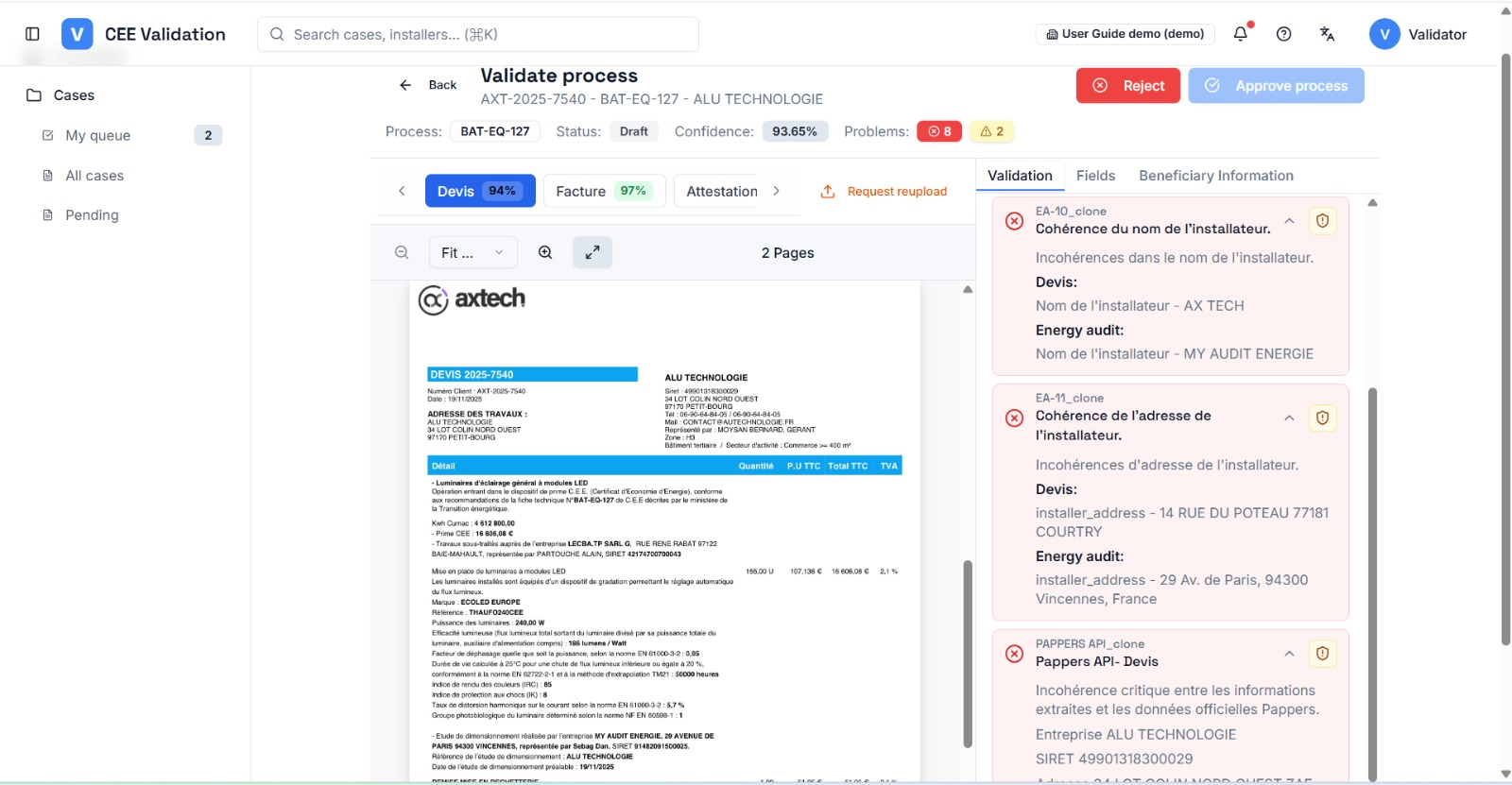
The “Validation” tab lists every CEE fiche check with its verdict — and you can override a failing rule with a written reason.
Every CEE fiche imposes checks: mandatory mentions, technical thresholds, quote/invoice consistency, dates in the right order… iverif runs them automatically and shows each verdict: passed, warning or error. The “Passed”, “Warnings” and “Errors” filters at the top of the tab let you focus on what needs a decision.
The workspace header summarizes the situation: the “Confidence” badge is the percentage of passed rules (warnings and overrides count as resolved), and the “Problems” badges count remaining errors and warnings. For consistency rules, the rule card puts the values found in each compared document side by side.
A failing rule is not necessarily fatal: if the dossier is actually compliant, you can override it from the icon at the rule's top right. An override requires a reason of at least 10 characters, which stays visible on the rule (“Manually validated: …”) and in the history.
Screenshots
Steps
- Open the “Validation” tabThis is the default tab in the right panel: every rule of the process is listed with its verdict.
- Prioritize by severityUse the “Errors” and “Warnings” filters (with their counts) at the top of the tab: red errors first, yellow warnings next. Passed rules need no attention.
- Read each failure's reasonEach rule explains what was checked and why it failed — often a missing or inconsistent value to fix in the Fields tab.
- Correct or overrideIf the value is wrong, fix it. If the rule is wrong (legitimate edge case), click “Override”, choose the final status (passed or error) and enter the reason.
- Check the confidence scoreAfter corrections and overrides, the “Confidence” badge updates: it reflects the share of resolved rules.
Watch out
Glossary
| Term | Definition |
|---|---|
| Blocking rule | A rule with “error” severity: until it is resolved or overridden, approval is impossible. |