Home / Administrator workspace
Tracking installers
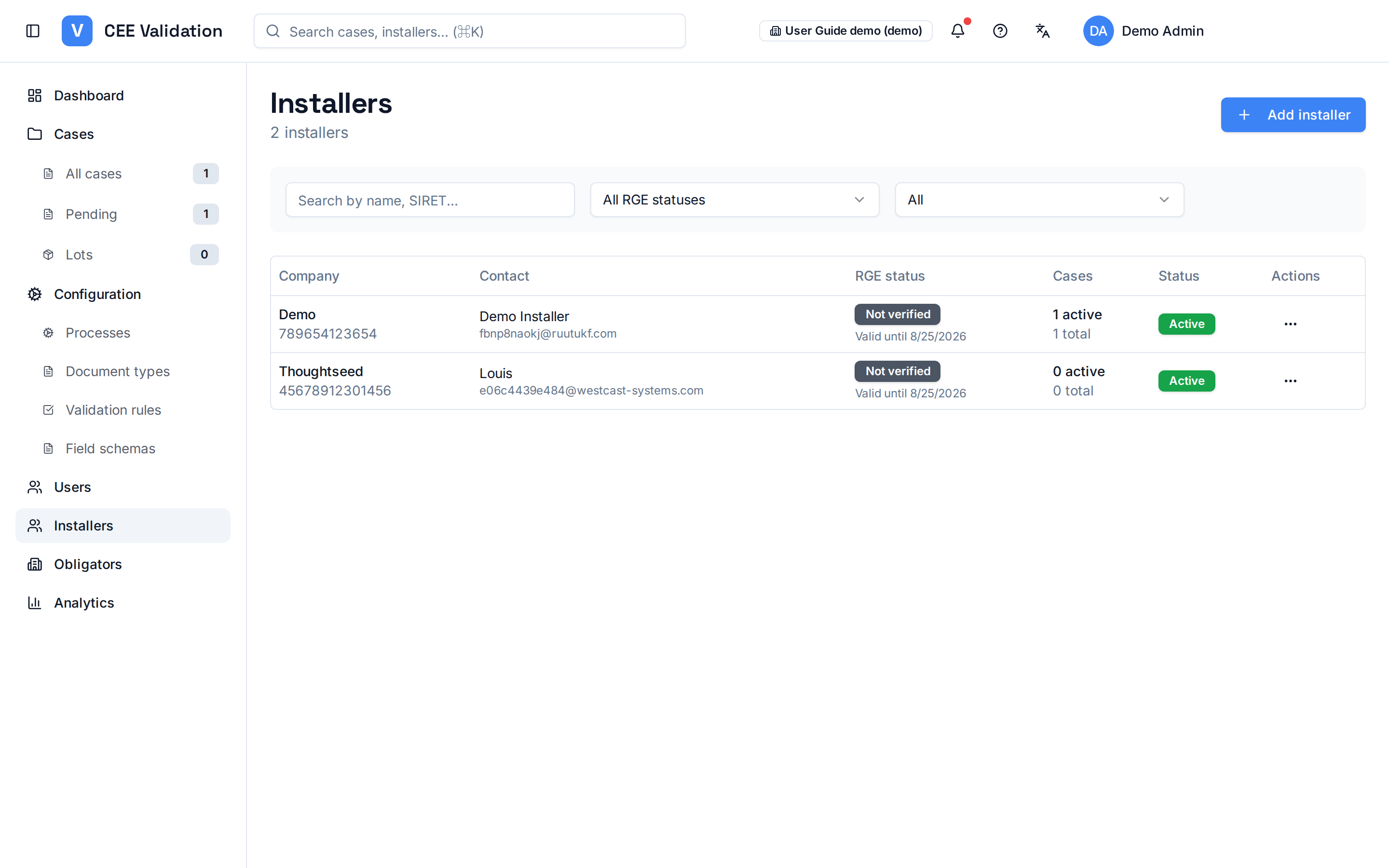
Your organisation's installer directory: RGE certification, SIRET and submitted dossier volume.
Installers are the companies submitting CEE dossiers on iverif. This page gives the consolidated view: company name, SIRET, RGE certification and submitted dossier counts.
RGE status (Reconnu Garant de l'Environnement) is decisive: most CEE fiches require works to be done by a certified professional. iverif shows the status (Valid, Expired, Not verified) with its effective date — an expired status on the works date is a frequent rejection cause.
Per-installer dossier counters help manage activity: who submits, in what volumes, and where to focus support.
Screenshots
Steps
- Open InstallersSidebar → “Installers”. The full directory appears.
- Search for an installerUse name or SIRET search to quickly find a company.
- Check RGE statusCheck the RGE column: an “Expired” or “Not verified” badge calls for action before letting the installer submit.
- Analyse activityPer-installer dossier counters show who actually contributes to your CEE volumes.
Glossary
| Term | Definition |
|---|---|
| RGE | Reconnu Garant de l'Environnement: qualification required for most CEE operations carried out for households. |