Configuring validation rules
The rule editor: scope (processes, documents, target fields), AI validation prompt, messages, severity — plus statistics, Excel import and overrides.
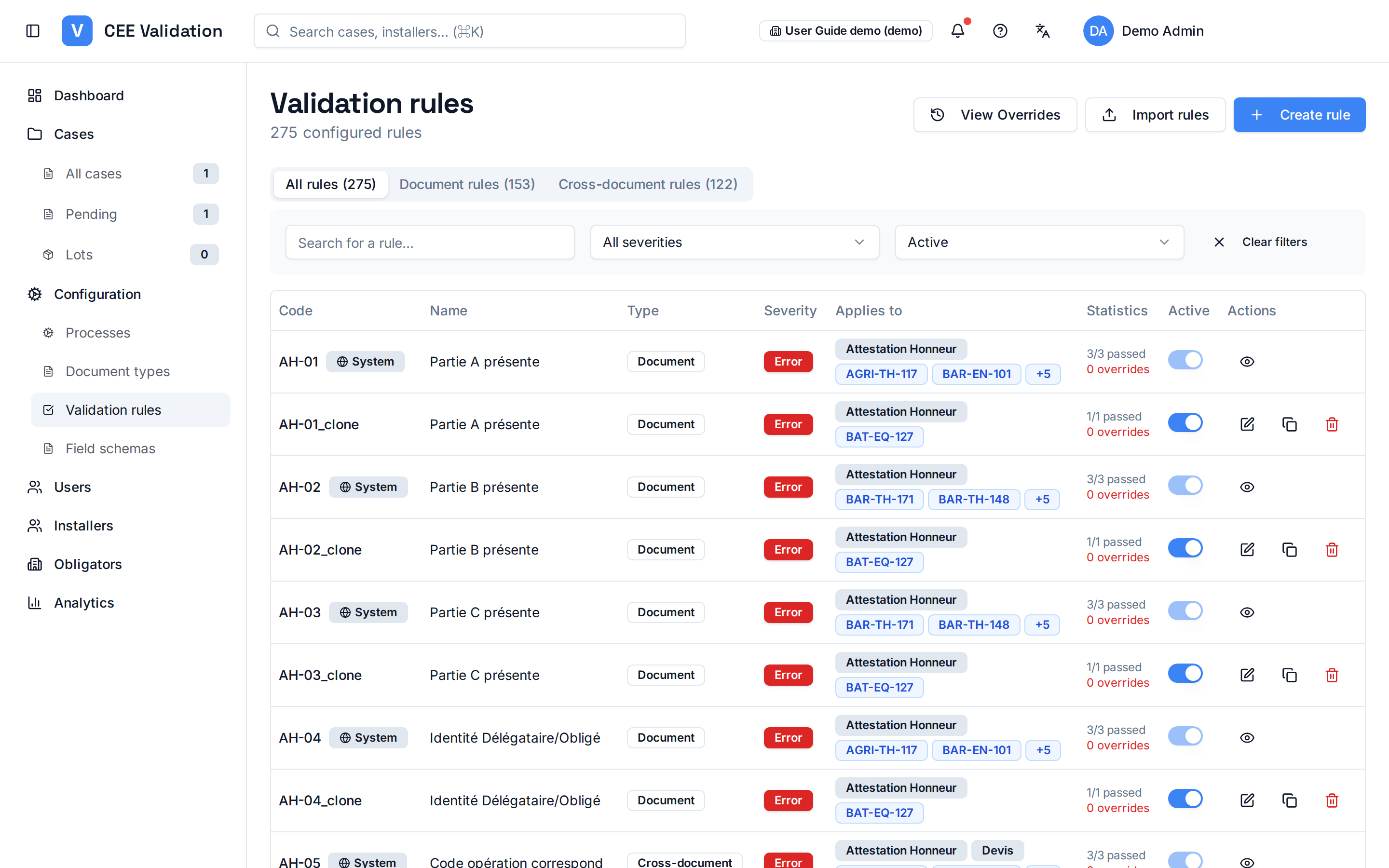
Rules are the core of automatic checking: each verifies one compliance condition — presence of a mention, technical threshold, date consistency. “Document” rules apply to a single piece; “Cross-document” rules cross several pieces (quote vs invoice, statement vs audit…). The Rules page lists them with their “passed / total” statistics, filterable via the “All rules”, “Document rules” and “Cross-document rules” tabs.
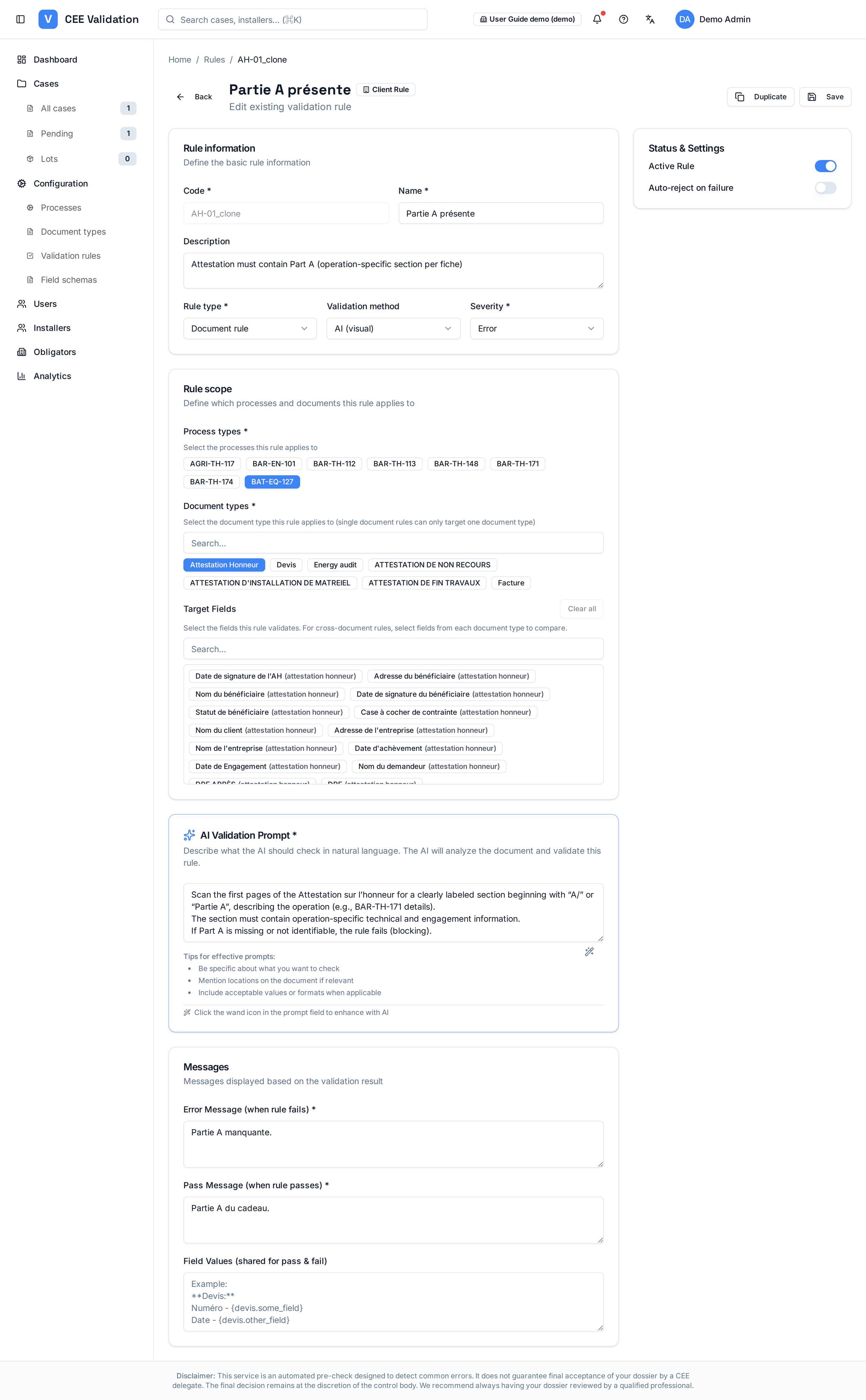
A rule is built in its editor, in four blocks. First “Rule information”: the type (document rule or cross-document rule), the validation method — including “AI (visual)”, which has the model read the piece — and the severity (blocking error, warning, info).
Then the “Rule scope”, which ties the rule to the rest of the configuration: “Process types” chips designate the affected fiches, “Document types” chips the pieces to read, and “Target Fields” chips the exact fields to check — precisely the fields defined in the document types' schemas (see “Configuring document types”). This process → documents → fields chain is what makes a rule created here automatically apply to the right dossiers.
The third block is the “AI Validation Prompt”: the rule is written in natural language (e.g. “check the quote mentions the reference of the installed equipment”), and the wand button enhances the prompt to make it more precise. The “Messages” block defines what the validator will read afterwards: an error message when the rule fails, a pass message when it passes, and the field values shown in both cases.
Finally the “Status & Settings” card activates the rule and can flag it “Auto-reject on failure”: a failure then automatically rejects the dossier. The “Duplicate” and “Save” buttons complete the editor tour. Excel import (template provided) creates rules in bulk, and the “View Overrides” page keeps the history of every manual validation made by validators.
Screenshots
Steps
- Open Configuration → Validation rulesThe “All rules”, “Document rules” and “Cross-document rules” tabs filter the list; the passed/total statistics reveal problematic checks.
- Create or open a rule“Create rule” opens the editor; cloning an existing rule (“Duplicate”) starts from a proven base. Rules can also be attached on the fly from the process creation wizard.
- Set the information and scopeRule type, validation method (e.g. AI visual), severity — then “Process types”, “Document types” and “Target Fields” chips to target exactly the schema fields to check.
- Write the AI validation promptExpress the check in natural language, then use the wand button to enhance the prompt; fill in the error and pass messages the validator will see.
- Activate and tune behaviourIn the “Status & Settings” card, activate the rule and decide whether a failure auto-rejects the dossier; “Save” applies.
- Bulk import and auditExcel import (xlsx template provided) aligns a complete repository; the “View Overrides” page lists every manual validation with its reason — your audit trail.
Glossary
| Term | Definition |
|---|---|
| Cross-document rule | Check verifying consistency across several dossier pieces (e.g. quote amount = invoice amount). |